Sliding Block1.4.4
Publisher Description


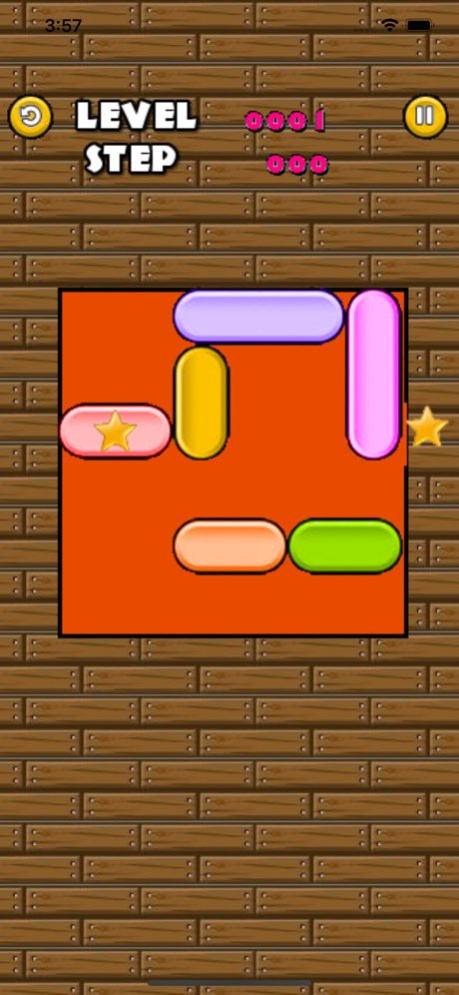

sliding block is a simple puzzle game.
The goal of this game is to get a block with start out of the board by sliding the other block out of the way.
we offerd more than 3000 puzzles for you to solve.
How to Play
You need to get the way of block the exit gate.
move the block with star out of the way.
Features.
- 3800 puzzle stage
- enjoy all for beginner and expert
- Very easy and quick
- it is all FREE!
Version History - IOS SDK update
- Admob SDK update 1.4.4 08/05/2025 - bug fixed 1.4.3 05/30/2020 -bug fixed 1.4.2 03/30/2020 - Support IOS 12
- Update Admob SDK 1.4.1 03/04/2019 - it changes UI 1.4.0 05/31/2016 1) admob sdks update
2) UI update 1.3.1 04/22/2015 - Enable Game Center 1.3 01/25/2014 1) it change title-picuture.
2) it fixed score of level
3) it fixed bug of reading block 1.2 12/12/2013 1) it changed display name
2) fixed memory bug 1.1 12/04/2013 1.0 11/30/2013
About Sliding Block
The company that develops Sliding Block is Eun Junseok. The latest version released by its developer is 1.4.4.
To install Sliding Block on your iOS device, just click the green Continue To App button above to start the installation process. The app is listed on our website since 2026-10-07 and was downloaded 2 times. We have already checked if the download link is safe, however for your own protection we recommend that you scan the downloaded app with your antivirus. Your antivirus may detect the Sliding Block as malware if the download link is broken.
How to install Sliding Block on your iOS device:
- Click on the Continue To App button on our website. This will redirect you to the App Store.
- Once the Sliding Block is shown in the iTunes listing of your iOS device, you can start its download and installation. Tap on the GET button to the right of the app to start downloading it.
- If you are not logged-in the iOS appstore app, you'll be prompted for your your Apple ID and/or password.
- After Sliding Block is downloaded, you'll see an INSTALL button to the right. Tap on it to start the actual installation of the iOS app.
- Once installation is finished you can tap on the OPEN button to start it. Its icon will also be added to your device home screen.
Program Details
System requirements
Download information
Pricing
Version History
version 1.4.4
posted on 2026-10-07
Version History - IOS SDK update
- Admob SDK update 1.4.4 08/05/2025 - bug fixed 1.4.3 05/30/2020 -bug fixed 1.4.2 03/30/2020 - Support IOS 12
- Update Admob SDK 1.4.1 03/04/2019 - it changes UI 1.4.0 05/31/2016 1) admob sdks update
2) UI update 1.3.1 04/22/2015 - Enable Game Center 1.3 01/25/2014 1) it change title-picuture.
2) it fixed score of level
3) it fixed bug of reading block 1.2 12/12/2013 1) it changed display name
2) fixed memory bug 1.1 12/04/2013 1.0 11/30/2013
version 1.4.4
posted on 2025-08-05
Aug 5, 2025
Version 1.4.4
- IOS SDK update
- Admob SDK update
version 1.4.4
posted on 2025-08-05
- IOS SDK update
- Admob SDK update
version 1.4.3
posted on 2020-05-30
30 May 2020 Version 1.4.3
- bug fixed
version 1.4.3
posted on 2020-05-30
May 30, 2020 Version 1.4.3
- bug fixed
version 1.4.2
posted on 2020-03-30
Mar 30, 2020 Version 1.4.2
-bug fixed
version 1.4.1
posted on 2019-03-04
Mar 4, 2019 Version 1.4.1
- Support IOS 12
- Update Admob SDK
version 1.4.0
posted on 2013-12-01
version 1.4.3
posted on 1970-01-01
2020년 5월 30일 Version 1.4.3
- bug fixed
version 1.4.3
posted on 1970-01-01
2020年5月30日 Version 1.4.3
- bug fixed
